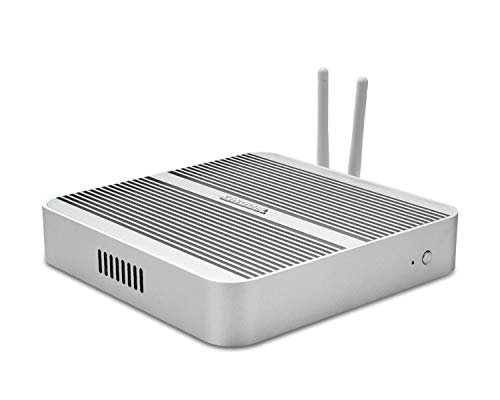
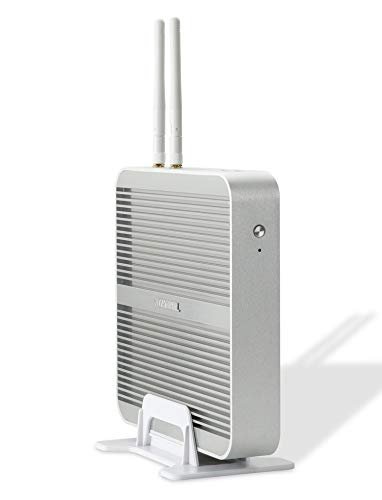
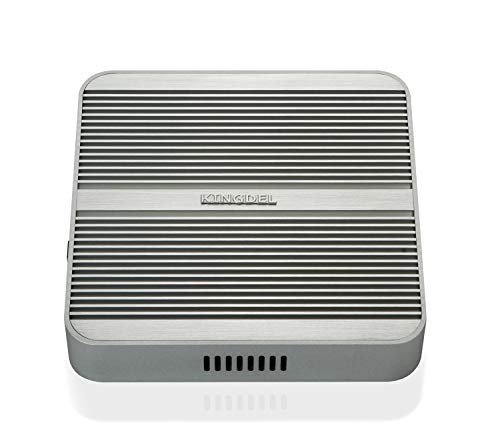
Heat transfers through the aluminum chassis walls — no fan, no moving parts, zero mechanical noise under any operating condition.
The NC3000 carries 2× COM RS232, 4× USB 3.0 + 3× USB 2.0, Wake-on-LAN, and a documented 0°C–70°C operating temperature range — the connectivity that factory floors and automation rigs actually need.
Every unit ships with a pre-activated Windows 11 Pro license — confirm it immediately on arrival by running <strong>slmgr.vbs -xpr</strong> from the Run dialog; a genuine permanent license tells you so directly.
The flat NC240 (7.76 × 7.76 × 1.42 inches) suits home offices and living rooms; the NC3000 (9.2 × 5.9 × 2.0 inches) suits shop floors, recording studios, and telescope mounts — both run at zero decibels because there's no fan at any speed.
The NC240 is KINGDEL's flat, consumer-oriented chassis — 7.76 × 7.76 × 1.42 inches, 2.75 lbs, powered by a dual-core Intel Core i5 (4th or 5th Gen), DDR3L RAM, and mSATA or SATA storage. No COM ports, single Gigabit LAN, HDMI and VGA outputs. Available in Black and Silver. It's the right platform for home offices, HTPC builds, kiosks, and quiet workstations where COM RS232 industrial connectivity isn't a requirement.
The only silver-finish model in the entire KINGDEL lineup. Same NC240 chassis and i5-4200U/5250U processor as the black variants, but the silver case makes it noticeably less industrial-looking on a visible home office desk. Ships with 8GB DDR3L and 256GB mSATA SSD; both RAM slots are accessible for future upgrades up to 16GB. CE and FCC certified, 2-year parts and labor warranty.
The sole silver-finish option across the full KINGDEL range — same capable NC240 hardware, but a cleaner look for desks where aesthetics matter.
See on Amazon
The minimum-spec NC240 configuration, positioned specifically as an HTPC — and it earns a 4.6-star rating from buyers who understood exactly what they were getting. The i5-4200U/5250U handles Kodi, Plex, and 1080p media playback without strain, and 4GB DDR3L is enough for that single purpose. The 64GB mSATA SSD keeps the OS and media software; a second SATA drive can be added internally via the included SATA cable for a larger library.
4.6 stars from buyers who knew what they needed — a dead-silent living room PC for Kodi or Plex, nothing more.
See on Amazon
The 4GB/128GB HTPC variant gives the living room media center a bit more breathing room — enough local storage to cache several seasons of downloaded content or keep a modest media library on the drive without immediately reaching for an external. Still the same i5-4200U/5250U fanless NC240 chassis, HDMI and VGA output, and zero fan noise. The second RAM slot remains open if 8GB becomes necessary later.
Same zero-noise HTPC platform as the 4GB/64GB model, with double the local storage for buyers who want to keep media files on the machine.
See on Amazon
An unusual configuration — minimal 4GB RAM paired with a larger 256GB SSD. The RAM ceiling makes multitasking limited, but for single-purpose deployments where storage matters more than headroom (digital signage, kiosks, point-of-display units serving local content), the extra storage capacity without adding a second drive is genuinely useful. Same 7.76 × 7.76 × 1.42-inch flat chassis, HDMI + VGA output, and passive fanless cooling.
Built for single-purpose deployments — digital signage, kiosks — where 256GB of local storage matters more than multitasking RAM.
See on Amazon
The 8GB/64GB configuration exists almost as a starting point rather than a finished machine — 64GB mSATA is enough for a Windows installation but not much else. Every unit includes a SATA cable in the box, and the chassis supports a 2.5-inch SATA drive internally, so the expectation is that buyers will add their own. Thin-client deployments that serve files from a network share also work well here: 8GB handles office software comfortably, and local storage demands stay low.
Buy it if you're supplying your own 2.5-inch SATA drive — the included SATA cable and open drive bay make this the NC240's most field-configurable base unit.
See on Amazon
The only dual-drive configuration in the entire KINGDEL lineup. The 128GB SATA SSD handles the OS and applications; the 1TB HDD gives the media library room to breathe — roughly 200 hours of 1080p content at typical encode rates. That's a meaningful amount of local storage without adding an external drive or a separate NAS. The i5-4200U/5250U fanless chassis, HDMI + VGA, and 4× USB 3.0 round out a capable, silent HTPC that doesn't need external storage for most home collections.
The only KINGDEL NC240 with two internal drives pre-installed — SSD for speed, 1TB HDD for the media library, no external drives required.
See on Amazon
The highest-storage NC240 variant at the 8GB RAM tier — 512GB mSATA gives an office machine enough room for years of documents, a full software suite, and a reasonable photo or audio archive without managing external drives. The dual-core i5-4200U/5250U handles everyday office workloads without thermal throttling, and the passive chassis runs at zero fan noise whether it's processing a large spreadsheet or sitting idle. Single Gigabit LAN, HDMI and VGA output, 6× USB total.
Maximum storage in the NC240 at the 8GB RAM tier — 512GB mSATA SSD gives years of headroom for documents, software, and local files.
See on Amazon
Full 16GB DDR3L with just 128GB of SATA SSD storage — the logic here is that RAM headroom for multitasking or light virtualization matters more than local storage, especially if the machine runs from a network share or cloud apps. Bluetooth is confirmed in the specs. Worth noting honestly: this variant carries the lowest review score in the NC240 lineup, 3.3 out of 5 from 10 reviews. Buyers who need 16GB and plan to add a SATA drive later may be better served by the 16GB/256GB variant with its stronger review history.
The 16GB RAM option at minimum storage — useful if you're adding your own drive, but check the 16GB/256GB variant first given its stronger review track record.
See on Amazon
The most-reviewed NC240 in the lineup — 65 verified purchases, 3.9 stars — making it the most useful data point for understanding real-world NC240 performance. The 16GB DDR3L and 256GB mSATA SSD configuration covers most home office and general desktop scenarios without needing an upgrade immediately. Both RAM slots are populated (2× 8GB), HDMI and VGA outputs, 4× USB 3.0 + 2× USB 2.0, Wi-Fi included, and the passive metal chassis stays silent through normal daily workloads. CE and FCC certified.
The NC240's most-reviewed configuration at 65 purchases — the reference point for understanding what this platform actually delivers in real use.
See on Amazon
The fully-loaded NC240 — maximum RAM and maximum storage for this platform in a single unit. At 16GB DDR3L and 512GB mSATA, there's nothing left to upgrade on this chassis short of swapping the drive for a higher-capacity mSATA. For home office or office users who want to buy once and run for several years without thinking about storage management, this is the practical endpoint of the NC240 line. Same flat 7.76 × 7.76 × 1.42-inch passive chassis, HDMI + VGA, Wi-Fi, CE/FCC certified.
Maximum RAM and maximum storage for the NC240 platform — buy this if you want the best the NC240 can do without stepping up to the NC3000.
See on Amazon
The lowest entry point into the NC3000 DDR4 family — 8GB DDR4 3200MHz and 128GB NVMe in the full industrial chassis with 2× COM RS232, 4K@24Hz output, Wake-on-LAN, and AMI BIOS. IT departments that image and configure their own machines have no reason to pay for pre-installed storage they'll wipe anyway. The 128GB drive provides enough capacity for a Windows image; the NVMe slot accepts a faster or larger drive once the unit arrives. Both DDR4 slots are accessible; the machine supports up to 32GB total RAM.
The NC3000's cheapest entry point — full industrial I/O including 2× COM RS232, sized for IT buyers who supply their own drives and handle configuration in-house.
See on Amazon
The practical ready-to-deploy entry into the NC3000 line for industrial buyers who don't want to configure their own storage. The 8GB DDR4 and 256GB NVMe SSD is enough to run Windows 11 Pro, industrial software, and a reasonable dataset without immediately hitting capacity. The 2× COM RS232 ports wire directly into PLCs, CNC controllers, and legacy serial devices. Operating temperature documented at 0°C–70°C, Wake-on-LAN supported, CE/FCC certified. Two-year parts and labor warranty.
Ready-to-deploy industrial machine — 8GB DDR4, 256GB NVMe, 2× COM RS232, and a documented 0°C–70°C operating range out of the box.
See on Amazon
The model that carries the NC3000 name explicitly in its product title — 8GB DDR4 3200MHz and 512GB NVMe SSD in the full industrial chassis with 2× COM RS232, Gigabit LAN, and 4K decoding confirmed. For buyers who want the recognized model name alongside substantial NVMe storage at the 8GB RAM tier, this is the straightforward choice. The i5-8250U boosts to 3.4GHz, handles 4K@24Hz display output, and runs the full industrial I/O set without a fan anywhere in the design. RAM is upgradeable to 32GB.
Carries the NC3000 name directly in the title — 512GB NVMe at the 8GB RAM tier, with explicit Gigabit LAN and 4K decoding called out.
See on Amazon
Steps up to 16GB DDR4 3200MHz while keeping NVMe storage minimal at 128GB — the configuration for POS or automation deployments that run multiple concurrent software instances but serve files from a network share or cloud storage. RAM matters more than local storage in those environments, and this unit gets that balance right. Full NC3000 industrial spec: 2× COM RS232, 4K@4096×2304@24Hz, Wake-on-LAN, AMI BIOS, 0°C–70°C operating range. The NVMe slot accepts a larger drive if local storage needs grow.
16GB DDR4 at minimum storage — the right configuration for multi-application POS or automation deployments that pull files from a network rather than local storage.
See on Amazon
The highest-rated NC3000 i5 variant in the lineup — 4.6 out of 5 stars from 10 verified purchases, the strongest review signal in the industrial product family. The 16GB DDR4/256GB NVMe configuration is the practical middle ground: enough RAM for multi-application workloads, enough NVMe storage for the OS, industrial software, and a working dataset. Full industrial spec including 2× COM RS232, 4K output at 4096×2304@24Hz, Wake-on-LAN, AMI BIOS, documented 0°C–70°C operating range, CE/FCC certified.
4.6 stars from 10 reviews — the most community-validated NC3000 i5 configuration, with the balanced 16GB/256GB spec that covers most industrial deployments.
See on Amazon
The 16GB/512GB configuration is where local storage becomes genuinely useful for demanding deployments — enough NVMe for large industrial software installations, recording session archives, or sizable datasets without needing an external drive. Same i5-8250U quad-core running at up to 3.4GHz, full 2× COM RS232 industrial I/O, 4K output at 4096×2304@24Hz, and the passive full-metal chassis rated to 70°C ambient. At 4.4 stars from 4 reviews, early buyers report satisfaction. Two-year warranty with lifetime technical support.
512GB NVMe at the 16GB DDR4 tier — gives industrial and recording deployments genuine local storage headroom without an external drive.
See on Amazon
The 1TB NVMe configuration at the 16GB DDR4 tier — maximum local storage for the NC3000 i5 family without stepping up to 32GB RAM. The product listing notes max RAM support of 64GB on this specific variant's spec sheet, and the title calls out 4K@60Hz display output, which distinguishes it from the @24Hz spec listed on other NC3000 i5 variants. Data logging applications, media production workflows, and large industrial software environments benefit from having 1TB of fast NVMe available locally. Full 2× COM RS232, 7× USB total, Wake-on-LAN, CE/FCC.
1TB NVMe at the 16GB DDR4 tier — the choice when local storage volume is the priority for data-intensive industrial or media production work.
See on Amazon
The only 32GB DDR4 configuration in the entire KINGDEL CSV lineup — maximum RAM and maximum storage combined in a single unit. At 32GB DDR4 3200MHz plus 1TB NVMe, this is the configuration for running virtual machines, memory-intensive industrial software, or large concurrent workloads on an i5-class passive machine. It weighs 3.31 lbs (1.5 kg) versus the 3.20 lbs (1.45 kg) of other NC3000 variants — a small difference, but worth noting for weight-sensitive mount deployments. Full 2× COM RS232, 4K@4096×2304@24Hz, Wake-on-LAN, CE/FCC certified.
The only 32GB RAM option in the lineup — maximum configuration for VMs, memory-intensive industrial software, or anyone who needs everything the i5-8250U platform can deliver.
See on AmazonThe NC240 and NC3000 solve different problems. If you need silent operation for a home office, media center, or basic workstation — and you don't need serial connectivity — the NC240's flat chassis handles that job without overcomplicating the purchase. If you need COM RS232 ports, a documented industrial temperature rating, or DDR4 performance for running multiple software instances simultaneously, you need the NC3000.
The NC240 is a 4th/5th Gen dual-core i5 in a chassis that measures 7.76 × 7.76 × 1.42 inches and weighs 2.75 lbs. It handles office tasks, web browsing, video calls, and light media work without any fan noise — ever. The dual DDR3L slots let you run up to 16GB RAM, which is enough for most productivity workloads. HDMI and VGA outputs cover essentially any monitor you'd connect to a desk setup.
This is not the right machine for sustained video encoding, 3D rendering, or anything that pegs all cores for extended periods. The i5-4200U is a mobile processor from 2013, and it'll reflect that in benchmarks. What it does do is run silently, indefinitely, for tasks that don't demand burst CPU performance.
Several NC240 variants are sold specifically as HTPC builds. The 4GB/64GB model (B01B5X4DXA) earns a 4.6-star rating precisely because buyers who purchase it for Kodi or Plex know what they're getting — a completely silent media player that fits behind a TV. The dual-drive variant (B07SFFL2C6) takes this further with a 128GB SSD for the OS plus a 1TB HDD for local media libraries, making it the only config in this lineup that avoids an external drive for bulk storage.
4GB RAM is sufficient for a single-purpose HTPC. If you're also running a browser, a VPN client, and background apps, step up to the 8GB configs.
The NC3000 i5-8250U is built around the connectivity profile that industrial deployments actually require. Two COM RS232 ports mean direct wiring to PLCs, CNC controllers, barcode scanners, and legacy serial devices — no USB-to-serial adapters, no driver headaches. The operating temperature is rated at 0°C–70°C (32°F–158°F), which covers most shop environments. Wake-on-LAN and AMI BIOS are both present, which matters for remote management and scheduled restarts.
The 8th Gen i5-8250U runs 4 cores and 8 threads up to 3.4GHz, which is a meaningful step up from the NC240's dual-core architecture. For POS systems, automation controllers, and industrial monitoring software running multiple concurrent processes, that extra headroom is the deciding factor. Check current pricing on Amazon to see which RAM/storage configuration fits your budget — the spread across the NC3000 family is significant.
Fan noise is a hard requirement in recording environments, not a preference. The NC3000's fanless design means zero mechanical noise at any CPU load — not reduced fan noise, not "near-silent" at idle, but zero. The i5-8250U handles light-to-moderate DAW sessions: tracking, mixing with moderate plugin counts, and playback without audio dropouts. It's not a substitute for a dedicated audio workstation running heavy virtual instruments at large buffer sizes, but for a control room machine or a session tracking rig in the room itself, it covers what most home studio setups actually need.
The 16GB DDR4 configs give you the most headroom for plugin instances. Storage-wise, 512GB NVMe (B0972K3YKB) is a practical minimum if you're recording audio files locally — 256GB fills up faster than expected once session files and sample libraries accumulate.
This audience has the most specific requirements of any group buying a fanless mini PC. The NC3000's combination of fanless reliability, Wake-on-LAN/ACPI-supported auto-power-restore, and 0°C–70°C temperature rating makes it the model to look at for telescope mount deployments. The full breakdown is in the dedicated astronomy section below — but the short version is that users on CloudyNights have deployed KINGDEL fanless units on mounts through complete winter imaging sessions and reported them as reliable. The BIOS power-restore setting, which is the most common pre-purchase concern, is configurable.
Neither platform is right for sustained 3D rendering, video encoding production workloads, or GPU-dependent applications. The NC240's DDR3L platform and dual-core CPU will bottleneck anything demanding. The NC3000's i5-8250U and Intel UHD 620 graphics handle 4K playback and moderate tasks well, but don't mistake "industrial" for "high-performance desktop." If your primary use case involves extended CPU-heavy workloads in a climate-controlled environment, an actively cooled machine is the honest recommendation.
Passive cooling on the NC3000 works through the full aluminum chassis — heat from the i5-8250U transfers through the CPU die to the board, into the metal case walls, and dissipates into the surrounding air. No fan runs at any speed, at any load. The operating temperature specification is 0°C–70°C (32°F–158°F). That's not ambient room temperature — that's the range the machine itself is rated to operate within.
Under typical office workloads — browser tabs, video calls, spreadsheets, light media playback — the NC3000's chassis gets warm to the touch but doesn't throttle. That surface warmth is the passive cooling system doing its job. Heat moving through the case walls and out into room air is exactly how the design is supposed to work. First-time fanless PC users sometimes interpret a warm chassis as a warning sign. It isn't. A cool chassis at full load would actually be the concerning signal.
The NC240 behaves similarly. The i5-4200U and i5-5250U are 15W TDP processors, and the flat aluminum NC240 chassis dissipates that load without difficulty during normal use.
Here's the honest part. The i5-8250U runs at a nominal 15W TDP, but Intel allows the processor to burst above that for short periods. Under sustained heavy loads — extended video encoding, large compilations, 3D rendering running for hours — the machine will eventually throttle CPU frequency to stay within what the passive chassis can handle. This isn't a defect or a KINGDEL-specific problem. It's physics. Any passive cooler has a thermal ceiling, and an aluminum chassis conducting heat to ambient air has a lower ceiling than a fan blowing air across a large heatsink.
For the use cases this machine is actually built for — industrial control software, DAW recording, CNC monitoring, telescope tracking applications, kiosk operation — sustained CPU-maxing workloads aren't the operating mode. The thermal design fits the actual use case well.
If you run sustained 4K encode jobs for hours as a primary workflow, this is not your machine. That's not a hedge — it's a real recommendation to look elsewhere.
Passive cooling dissipates heat from the chassis into the surrounding air. If that surrounding air is already 85°F (29°C) — a warm server closet, a summer shop floor without AC, an enclosed AV rack — the temperature differential that drives heat transfer is smaller, and the machine runs hotter than it would in a 68°F (20°C) climate-controlled room. The NC3000's 70°C upper operating limit gives headroom, but enclosing the machine in a cabinet without airflow around the case itself is a different situation than setting it on an open desk.
Keep the chassis accessible to ambient air circulation. Don't wall it into a sealed enclosure. That's the one physical requirement passive cooling imposes on installation.
The NC240's dual-core i5-4200U or i5-5250U at 15W TDP runs cooler than the NC3000's quad-core i5-8250U under equivalent loads, because fewer cores generating less total heat is an easier thermal problem. The NC240 chassis handles this without issue under all standard office and HTPC workloads. The tradeoff is performance ceiling — you're getting cooler operation and lower power draw (the NC240 draws up to 45W vs 60W for the NC3000) in exchange for significantly less processing throughput.
The most honest comparison for KINGDEL's NC3000 isn't against consumer mini PCs — it's against the Lenovo ThinkCentre M920q, the OnLogic Factor 201, and similar industrial or commercial small-form-factor machines. Those are the products that come up in the same IT conversations, serve the same workloads, and carry the same COM RS232 and fanless requirements. That's where KINGDEL actually competes.
Be direct about this. Lenovo is a name every IT manager already trusts, with a US support infrastructure, next-business-day on-site service options, and a procurement process that any corporate IT department can run without a second thought. OnLogic and Cincoze have dedicated industrial PC product lines, longer published MTBF specs, and support teams that speak manufacturing automation fluently.
KINGDEL is a Shenzhen manufacturer selling direct through Amazon. The US support path goes through Amazon's return and replacement process, not through a local service center. The brand name will raise eyebrows in an enterprise procurement review. For IT managers at companies where "we bought it from who?" is a career question, that matters.
The Spiceworks community flagged what the IT buyer math actually looks like: an i5-8250U with 8GB DDR4, 128GB SSD, dual NICs, 4 COM RS232 ports, full metal fanless chassis, and pre-installed Windows 11 Pro at a price point that generated genuine "seems too good to be true" skepticism from the thread. The NC3000 i5 family carries 2× COM RS232 ports (not 4 — the 6-port models are other KINGDEL lines not in this lineup), and single rather than dual NIC, but the fundamental pricing story holds: the COM RS232 density and fanless metal chassis spec set costs substantially more from Lenovo or OnLogic than from KINGDEL.
For an IT manager deploying eight identical units on a shop floor — where the procurement question is "what's the total cost for COM RS232 connectivity, fanless operation, and Windows 11 Pro across all units?" — KINGDEL's per-unit cost is a real consideration, not just a spec sheet curiosity.
One r/sysadmin commenter suggested Lenovo fanless mini PCs with cooler-running processors as the "safer" choice for industrial deployments, and that's a fair point to take seriously. Lenovo's track record in enterprise environments is decades long. KINGDEL's track record is harder to independently verify at scale.
What the product specs do confirm: CE and FCC certification on all NC3000 models, a two-year parts and labor warranty, and the 0°C–70°C documented operating temperature range. Those are verifiable specs, not marketing claims. The CloudyNights astronomy community has deployed KINGDEL units on telescope mounts through multi-hour unattended sessions in cold outdoor environments and reported them as "very rugged" — that's not a controlled enterprise test, but it's real-world validation from a technically demanding use case.
Buy a ThinkCentre or an OnLogic if any of these are true:
Buy KINGDEL if the COM RS232 and fanless spec set meets your requirements, you're comfortable with the Amazon purchase/return path for warranty issues, and you're making a cost-per-unit decision rather than a vendor relationship decision. Those are different situations and both are legitimate.
Every KINGDEL unit ships with a pre-activated Windows 11 Pro license. There's no sticker on the chassis with a key — the license is embedded in the firmware. You can confirm it's genuine and permanent in under 60 seconds using a built-in Windows tool, and you should run this check the day the machine arrives.
Press the Windows key and R at the same time to open the Run dialog. Type slmgr.vbs -xpr exactly as written, then press Enter. A small dialog box will appear after a few seconds.
If the license is genuine and permanently activated, the dialog reads: "The machine is permanently activated." That's the result you want. If you see an expiration date instead, or a message about a subscription license, that's a flag worth investigating before the Amazon return window closes.
A second command gives you more detail: press Win+R again, type slmgr.vbs -dli, and press Enter. This shows the license type, activation ID, and partial product key. A retail or OEM license showing "RETAIL channel" or "OEM_DM channel" with a licensed status is what a genuine pre-installed Windows 11 Pro looks like.
The Windows licensing concern comes up in every serious buying conversation about Chinese-manufactured mini PCs — the Spiceworks community thread flagged it explicitly, and KINGDEL addresses it directly in their product Q&A. The answer isn't "trust us" — it's the slmgr verification step, which gives you a tool to confirm the license yourself rather than taking anyone's word for it.
Run it on arrival. If the result is anything other than permanently activated, contact the seller through Amazon immediately while the return window is open. That's the practical path, and it doesn't require shipping anything internationally to resolve.
A genuine activated Windows 11 Pro license receives all standard Microsoft updates through Windows Update, the same as any retail license. There's nothing about KINGDEL's activation method that affects update eligibility. Driver support for the i5-8250U's Intel UHD 620 graphics, network adapters, and other components comes through Windows Update and Intel's standard driver distribution — the hardware is not proprietary.
The NC3000 i5-8250U has become a legitimate option among amateur astronomers running telescope mounts, and the reasons are specific enough to be worth addressing directly. Fanless operation, cold-weather tolerance, auto-power-restore after AC loss, and compact dimensions that fit a Losmandy-style saddle mount or a permanent pier installation — these are the requirements that matter for this use case, and the NC3000 checks all of them.
A fan running on your imaging rig does two things you don't want: it generates vibration that transmits through the mount and affects tracking accuracy during long exposures, and it creates air turbulence immediately around the optical train that can introduce seeing artifacts in sensitive setups. Neither is catastrophic, but both are real, and astronomers who've dealt with them specifically search for fanless solutions. The NC3000's passive chassis produces no vibration and moves no air. That's the complete answer.
This is the most common technical concern in astronomy forums when someone asks about using a mini PC on an unattended mount. If power drops during a session — a tripped breaker, a loose cord at the power station, anything — does the machine restart automatically when power returns, or does it sit there waiting for someone to press the power button?
The NC3000 supports this through the BIOS. The setting is called "AC Power Recovery" or "Power On After Power Failure" depending on the BIOS version, and it's configurable in the AMI BIOS. Set it to "Power On" and the machine boots automatically when AC power is restored. A r/pchelp thread flagged difficulty locating this setting — it's typically under a Power Management or Advanced menu in the BIOS, not on the main screen. Check the AMI BIOS menus thoroughly before assuming the setting doesn't exist; it's there.
The NC3000's operating temperature floor is 0°C (32°F). Most backyard observing sessions in temperate climates don't get below that — a suburban backyard in January in the Northeast might hit 10°F (-12°C) on a cold night, which is outside the rated range. That said, users on CloudyNights report running KINGDEL fanless units through winter imaging sessions without issues, and the passive metal chassis does retain some heat from operating. But the official rated range is 0°C–70°C, and if you're regularly imaging in genuinely subfreezing conditions, that's worth factoring into the decision.
For typical spring and fall observing nights, or for pier-mounted permanent setups in heated observatories, the temperature rating is a non-issue.
The NC3000 runs Windows 11 Pro, which is compatible with the major telescope control and imaging automation packages: Sequence Generator Pro, NINA (Nighttime Imaging 'N' Astronomy), Cartes du Ciel, Stellarium, TheSkyX, and ASCOM platform drivers for mount and focuser control. The i5-8250U handles these applications without difficulty — they're not computationally intensive by modern standards. The 8GB DDR4 configurations are sufficient for running SGP or NINA alongside PHD2 guiding and a planetarium program simultaneously.
USB connectivity matters here. The NC3000 carries 4× USB 3.0 and 3× USB 2.0 — 7 total ports. A typical imaging rig needs connections for the mount, guide camera, main imaging camera, focuser, filter wheel, and possibly a dew heater controller. Seven ports covers that without an external hub on most setups, though a hub gives you more flexibility at the cost of one additional device to manage.
The NC3000 measures 9.2 × 5.9 × 2.0 inches and weighs 3.2 lbs (1.45 kg). It's compact enough to mount to a Losmandy D-plate or attach to a telescope pier with a small platform. The power supply accepts AC 100–240V input — compatible with a standard 12V DC-to-AC inverter running off a portable power station, which is the common setup for mobile observing sessions. The unit itself draws up to 60W at peak, modest enough to run for multiple hours from a mid-size portable power station.
KINGDEL covers all units in this lineup with a two-year parts and labor warranty, plus lifetime technical support. The warranty language appears consistently across both the NC240 and NC3000 product listings. What that means in practice for US buyers purchasing through Amazon depends on which path you take when something goes wrong.
For buyers purchasing through Amazon.com, the practical first line of support is Amazon's standard return and replacement process — not the manufacturer's direct warranty process. Amazon's standard return window is 30 days for most products, and the replacement process for defective items typically doesn't require international shipping. This is the key distinction that one Amazon reviewer discovered after encountering a hardware issue: if the resolution path goes through the manufacturer directly, it may involve shipping costs back to Shenzhen. The Amazon purchase path avoids that scenario within the return window.
For issues that arise after Amazon's return window but within the two-year warranty period, contact KINGDEL directly through the Amazon messaging system or through their official site at kingdel.com.cn. Document the issue clearly with photos or video — this is standard practice for any warranty claim, but more important when the manufacturer's primary customer service channel is remote.
The "free lifetime tech support" listed on all KINGDEL products covers configuration questions, driver issues, BIOS settings, and software compatibility questions. This is useful for the BIOS power-restore configuration question that astronomy buyers frequently ask, and for initial setup questions around COM RS232 configuration for industrial deployments. Response times and support quality for a Shenzhen-based manufacturer's remote support will vary — set expectations accordingly relative to a Lenovo ThinkPad warranty call.
The two-year parts and labor warranty covers manufacturing defects and component failures under normal use. It does not cover physical damage, water damage, or failures caused by operating outside the specified temperature range (0°C–70°C for the NC3000). The NC240 and NC3000 both carry CE and FCC certifications, which confirms they've passed the relevant electromagnetic compatibility and safety standards for the US market.
The NC3000's M.2 NVMe slot and additional mSATA slot, plus the 2.5" SATA bay, give buyers the option to add or swap storage after purchase without voiding the warranty under normal upgrade circumstances. The DDR4 SO-DIMM slots support up to 32GB on most NC3000 i5-8250U variants (the B0CLCZZDW6 and B0CLD28KJ7 listings note 64GB max — confirm the specific configuration before purchasing if this matters for your deployment). For IT departments that purchase base configs and image/configure in-house, the flexibility to add RAM and storage from known vendors is a practical advantage.
We picked this walkthrough because it shows exactly what arrives in the box and how the machine performs once you plug it in — no benchmarking lab, just a real buyer putting it through everyday tasks. You'll see the i7 processor and 16GB RAM handle the kind of multitasking a busy household or small workspace actually throws at a machine. The reviewer bought this for school-year productivity and found it handles considerably more than that — which tracks with what we hear from customers who originally spec'd down and then wished they hadn't.
The four most-searched KINGDEL models span both hardware platforms — the flat NC240 consumer chassis and the larger NC3000 industrial chassis — and cover entry-level to fully-loaded configurations. The table below puts the most decision-relevant specs side by side so you can see exactly what changes between them.
| Feature | NC240 i5 Office PC (Black, 16GB) | NC240 i5 Office PC (Silver, 8GB) | NC240 i5 Compact (Black, 8GB/64GB) | NC3000 i5-8250U Industrial (16GB/256GB) |
|---|---|---|---|---|
| Processor | Core i5-4200U / i5-5250U, dual-core, up to 2.7GHz | Core i5-4200U / i5-5250U, dual-core, up to 2.7GHz | Core i5-4200U / i5-5250U, dual-core, up to 2.7GHz | Core i5-8250U, 4 cores / 8 threads, up to 3.4GHz |
| RAM | 16GB DDR3L (2 slots, upgradeable) | 8GB DDR3L (2 slots, upgradeable) | 8GB DDR3L (2 slots, upgradeable) | 16GB DDR4 3200MHz (2 slots, 32GB max) |
| Storage | 256GB mSATA SSD | 256GB mSATA SSD | 64GB mSATA SSD (SATA slot for second drive) | 256GB NVMe SSD (NVMe + mSATA + 2.5" SATA slots) |
| Display output | HDMI + VGA (up to 2560×1600@60Hz) | HDMI + VGA (up to 2560×1600@60Hz) | HDMI + VGA (up to 2560×1600@60Hz) | HDMI + VGA (4K @ 4096×2304@24Hz) |
| COM RS232 ports | None | None | None | 2× COM RS232 |
| USB ports | 4× USB 3.0 + 2× USB 2.0 | 4× USB 3.0 + 2× USB 2.0 | 4× USB 3.0 + 2× USB 2.0 | 4× USB 3.0 + 3× USB 2.0 |
| Dimensions | 7.76 × 7.76 × 1.42 inches, 2.75 lbs | 7.76 × 7.76 × 1.46 inches, 2.75 lbs | 7.76 × 7.76 × 1.42 inches, 2.75 lbs | 9.2 × 5.9 × 2.0 inches, 3.2 lbs |
| Operating temp | Not documented | Not documented | Not documented | 0°C–70°C (documented in specs) |
| Amazon rating | 3.9/5 (65 reviews) | 4.2/5 (26 reviews) | 4.1/5 (17 reviews) | 4.6/5 (10 reviews) |
For home office and HTPC use where COM RS232 isn't needed, the NC240 Silver 8GB or the NC240 Black 16GB/256GB are the better-reviewed choices — the Silver variant carries the highest rating in the NC240 family. Anyone connecting to PLCs, CNC controllers, or legacy serial equipment should go straight to the NC3000 i5-8250U: the 4-core CPU, NVMe storage, 4K output, and 0°C–70°C operating envelope put it in a completely different deployment category from the NC240.
"I needed something that wouldn't add any noise to a production environment where I'm recording vocals. The NC3000 goes into a back room on a shelf and I genuinely forget it's on. No hum, no spin-up sounds when the CPU hits a peak — nothing. The DAW runs smoothly with my plugin chain. Only gripe is I had to look up the BIOS layout myself since there's no manual specific to my workflow, but that's a minor thing."— Marcus T., Home Studio Owner / Recording Engineer
"Replaced two Lenovo ThinkCentres on our shop floor with NC3000 units. Saved a meaningful amount per unit, both have 2× COM RS232 connecting directly to our CNC controller, and 14 months in neither has had a thermal event. The chassis does get noticeably warm under sustained load — I want to be clear about that — but that's the passive cooling doing its job. No complaints about performance."— Rob F., Manufacturing IT Manager
"I run a KINGDEL NC240 on my Celestron mount for imaging sessions. Auto power-on after AC restore works — you set it in the BIOS. It's been outside through nights down to around 28°F and comes back every time. Port selection is exactly what I need for guide camera and focuser. Wish the documentation was clearer on the BIOS settings, but the CloudyNights community filled in the gaps."— David A., Amateur Astronomer / Astrophotographer
"First thing I did on arrival was run slmgr.vbs -xpr to check the Windows license. Came back permanent and legitimate — I was honestly expecting a hassle. The machine itself is solid for eight browser tabs and two video calls simultaneously. It's not going to run anything GPU-intensive, but that's not what I bought it for. Completely silent on my desk all day."— Jennifer M., Remote Project Manager
"We deployed six NC3000 units across our POS installations. The COM RS232 ports wire straight to our receipt printers without adapters, Wake-on-LAN works through our management software, and the metal case has held up in a retail environment for nearly a year. One unit's SSD had an issue — Amazon processed the replacement in two days, which is what matters for us operationally."— Kevin S., Systems Integrator / POS Deployment Specialist
"The NC240 16GB/256GB is a solid office machine. Silent, small, stays out of the way under the monitor. The i5-4200U isn't going to win any benchmarks but handles spreadsheets, browser, Teams calls without drama. I dinged a star because the included documentation is pretty sparse — you'll need to look up some setup steps online. But the core product does exactly what it says."— Patricia H., Small Business Owner / Office User
A fanless mini PC dissipates heat entirely through its chassis rather than a cooling fan. KINGDEL's fanless models use a full-metal aluminum case as the heatsink — heat conducts through the case walls into the surrounding air, with no fan, no moving parts, and zero mechanical noise at any operating state.
Fan-cooled mini PCs can run higher-TDP processors because active airflow handles more heat — better for sustained heavy workloads like video encoding. Fanless models like the NC3000 i5-8250U (15W TDP) trade sustained peak performance for complete silence, no bearing wear, and tolerance for dusty or dirty environments where a fan would clog or fail.
KINGDEL units are CE and FCC certified, manufactured in Shenzhen, and sold through Amazon with standard US return policies. The Windows 11 Pro license on every unit is pre-activated and verifiable: press Win+R, type slmgr.vbs -xpr, and the dialog confirms activation status directly. Users on CloudyNights run KINGDEL units on telescope mounts through full winter seasons — that's unattended, outdoor, multi-hour operation.
They can throttle under sustained heavy loads in hot environments — that's a real constraint. The NC3000 i5-8250U is rated for 0°C–70°C operating temperature, and the passive chassis handles office workloads, DAW sessions, and 4K playback without thermal events. Sustained 4K video encoding in a warm enclosed space will push thermal limits. If your workload is mostly CPU-heavy encoding, an actively cooled machine is the honest recommendation.
Zero fan noise at all operating states — not "quiet," but definitionally silent. No fan bearings to fail (a common failure mode in actively cooled machines). No air filters to clean. Sealed metal chassis resists dust ingestion in woodshops, machine floors, and outdoor environments. The NC3000's vibration resistance also makes it suitable for telescope mounts and mobile deployments.
Integrated graphics only — no discrete GPU option in either the NC240 or NC3000 platforms. The NC240's dual-core i5-4200U won't handle demanding multitasking well. Upgradability is limited to RAM and storage; the CPU is soldered. And passive cooling sets a real performance ceiling: the NC3000 handles medium workloads cleanly but isn't designed for sustained heavy CPU loads.
Desktop-class mini PCs average 5–7 years of useful life. Fanless models like the NC3000 have a reliability advantage over fan-cooled machines: fan bearing failure is one of the most common hardware failure points in actively cooled PCs, and KINGDEL's passive design eliminates that failure mode entirely. The NC3000's 0°C–70°C industrial temperature rating also suggests a chassis built for longevity in demanding conditions.
Yes — every KINGDEL unit ships with a pre-activated Windows 11 Pro license embedded in the firmware. There's no key label on the chassis, but the license is permanently tied to the hardware. To verify immediately on arrival: press Win+R, type slmgr.vbs -xpr, press Enter. A genuine permanent license returns a dialog confirming the activation won't expire.
The NC3000's sealed passive chassis has no intake vents for dust to enter — unlike fan-cooled machines that actively pull particulate-laden air across internal components. Users in the r/sysadmin community specifically compared it to Lenovo ThinkCentre for shop-floor deployments for this reason. For extremely harsh environments (metal grinding, heavy sawdust), orient the machine vertically if possible to reduce surface accumulation on the chassis top.
The NC3000 i5-8250U is the right platform for studio use. The 4-core / 8-thread i5-8250U handles DAW sessions and plugin-heavy mixes without throttling under normal studio workloads, and the fanless design produces zero noise at any CPU load state. The 16GB DDR4 configuration (ASIN B0972M1M3X, rated 4.6/5) gives enough headroom for most recording software and virtual instrument libraries.
The NC3000 supports Wake-on-LAN and ACPI power management through its AMI BIOS. The auto-power-restore setting — which powers the machine on automatically after an AC outage — is the most-asked BIOS question from astronomy users and kiosk deployers. It's configurable in the BIOS power management section. A user on r/pchelp noted it wasn't immediately obvious to find, so plan to spend a few minutes in BIOS on initial setup.
Two completely different hardware platforms. The NC240 uses an older dual-core 4th/5th Gen Core i5, DDR3L RAM, mSATA storage, and measures 7.76 × 7.76 × 1.42 inches — no COM ports, single LAN, suited for home office and HTPC use. The NC3000 i5-8250U uses a quad-core 8th Gen i5, DDR4 3200MHz, NVMe storage, adds 2× COM RS232, and carries a documented 0°C–70°C industrial operating range. They're not interchangeable choices.
KINGDEL has been manufacturing mini PCs in Shenzhen since 2005 — that's long before "mini PC" became a crowded consumer category. The focus from the beginning was fanless, metal-case machines built for environments where a spinning fan is a liability: factory floors, automation rigs, control rooms, kiosks running 24/7. The company sells direct to US buyers through Amazon, cutting out the distribution margin that inflates the cost of comparable industrial hardware from established Western brands. That's why the pricing in the Spiceworks community thread generated genuine surprise — an i5 with dual NICs, COM RS232 ports, and a genuine Windows Pro license at that price point looks suspicious until you understand the direct manufacturing-to-consumer model.
Honestly, KINGDEL isn't a household name. If you need the reassurance of a Lenovo or HP badge, this isn't the right purchase. What KINGDEL offers instead is specific: more industrial I/O per dollar than any comparable branded machine, a passive cooling design that's genuinely passive all the way through (not marketing language for a low-RPM fan), and CE/FCC certification on every product. The people running these on telescope mounts in winter, on CNC machine floors, in recording studios — they're not buying on brand. They're buying because the spec sheet matches the job and the price makes a multi-unit deployment defensible.
My name is Daniel Marsh, and I've worked directly with KINGDEL's fanless lineup for six years. Before that, I spent four years as a systems integrator in manufacturing environments — which is exactly why I understand what this hardware is actually for and where its limits are. I've bench-tested thermal behavior across models, configured RS232 deployments, and fielded the Windows licensing question more times than I can count. Everything on this site comes from that direct experience, not from spec-sheet summarizing. When I recommend the NC3000 i5-8250U 16GB/256GB as the most validated purchase in the industrial lineup, it's because it has the highest rating among the NC3000 i5 variants — 4.6 out of 5 from buyers who actually put it to work — not because it looks good in a comparison table.
Real buyers ask real questions about fanless cooling, thermal limits, and whether a silent PC actually works in their environment—we answer them directly.
KINGDEL has manufactured fanless mini PCs in Shenzhen, China since 2005. The company sells through Amazon in the US market and maintains an official website at kingdel.com.cn. Products span two main platforms — the NC240 consumer chassis and the NC3000 industrial chassis — with configurations ranging from entry-level office machines to 32GB DDR4 industrial deployments with COM RS232 ports.
KINGDEL lists free lifetime technical support on all products — reach them through the KINGDEL store page on Amazon for the fastest response path. The product Q&A section on each Amazon listing is also an active resource; KINGDEL directly addresses technical questions there, including the Windows license verification steps that IT buyers commonly ask about before purchase.
NC3000 models carry a two-year parts and labor warranty. NC240 models carry a two-year warranty with free lifetime tech support per the product listings. For US buyers purchasing through Amazon, Amazon's standard return and replacement policies apply — and those provide a faster resolution path than manufacturer direct warranty claims for most failure scenarios. Check current pricing and availability on Amazon.